
| This article will teach you everything you need to know about the SchoolSpace Activity Feed. You’ll learn how to use the Activity Feed to discover live games, active groups, and new events. |
Keep reading to learn about:

What is the Activity Feed?
The Activity Feed shows notifications about things happening right now in your SchoolSpace world. With the SchoolSpace Activity Feed you click a button and instantly join the fun! You can access the Activity Feed in This World  on the left sidebar.
The Activity Feed makes it easy for anyone in the world to find things to do and people to engage with. Think of it as a news bulletin for your world that lets people join the action without feeling awkward or lost. But make sure you pay attention! Your Activity Feed will refresh every time you join a world.
Where are Activity Feed notifications?
Activity Feed notifications appear in This World  in the left sidebar. You’ll see a summary of notifications and can expand to view all notifications. There are several types of notifications shown in the Activity Feed. You’ll see notifications about:
- Groups of 5 or more people in Landmark Zones
- Games starting
- Games in need of more players
- New high scores achieved in games
🔥 Big crowd alert!
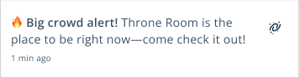 |
This appears when there are 5 or more people in a Landmark Zone. Big Crowd Alerts help connect people with larger groups or find the action. Big Crowd Alerts will also show up on the Landmark Zone in the “This World” drawer. If there is a group of 5 or more gathered when you join the world, you’ll see a Big Crowd Alert right away!
🚀 Game on!
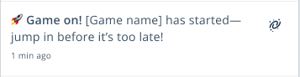 |
This appears when a new game has started. Game On makes it easy for people to spectate games or get where they need to be so they can join the next round.
⏳ Waiting for players!
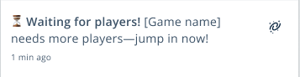 |
This appears when a multiplayer game has started but more players are needed to continue the game. Waiting for Players helps decrease social anxiety by making it easier for people to find the players they need for a game. If you join the world and someone needs more players for a multiplayer game, you’ll see a Waiting For Players notification right away!
🥇 New High score!
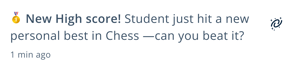 |
This appears when someone sets a new high score in a game. New High Score helps encourage friendly competition and increase engagement.
To Use the Activity Feed:
- Click This World on the left sidebar to open the This World Summary
- To view the Activity Feed preview:
- Look for the Activity Feed heading in the This World summary view. This will show you the three most recent Activity Feed notifications
- If you want to see all Activity Feed notifications, click View All or follow the steps below
- Click the Activity Feed menu item
- This will open a list of all recent notifications since you joined the world
- To move to the place or game in the notification, click the Teleport
 icon next to the notification
Keep Learning!
Now that you know all about using the Activity Feed, check out these articles to dive deeper:
Sending and Receiving Chat Messages
Video Chat: How Conversations Start
Users Menu: Communication Settings and Current Users