
| This article explains what Jelly Jumper is, how to play, and how admins add Jelly Jumper to a world. |
Keep reading to learn about:
 Adding Jelly Jumper to a World
What is Jelly Jumper?
Jelly Jumper is an endless runner-style game where players guide a jelly character through a continuous obstacle course. Players try to time jumps correctly to avoid hazards like walls, spikes, pipes, and gaps while maintaining control as the pace increases over time.
Players earn points by successfully passing obstacles or reaching distance milestones. Optional collectables such as gems or coins may also appear, offering bonus points.
 |
Playing Jelly Jumper
Everyone can play Jelly Jumper! You can play solo or with two players.
If you don't have a friend to play with, try sending a message in the 'Everyone in World' chat channel and invite someone to join your game.
To Play as a Single Player:
- Click the Jelly Jumper key asset.

- The game window will pop up, select Single Player.
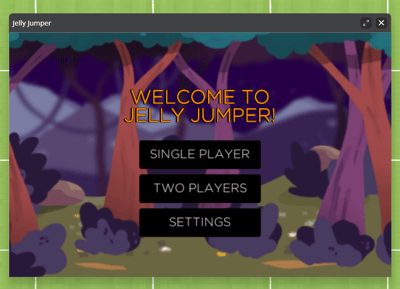
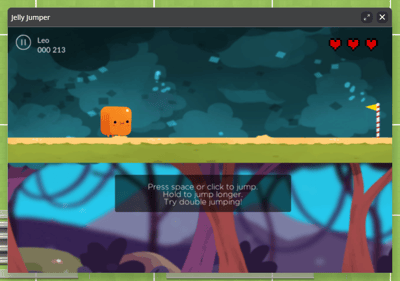
- The game will start immediately. Use your spacebar to jump across gaps and avoid obstacles! When all three of your lives are gone, the game ends.
To Play with Two Players:
- Click the Jelly Jumper key asset.
- The game window will pop up, select Two Players.
- Click Create Room if you want to host or Join Room to join an existing room.
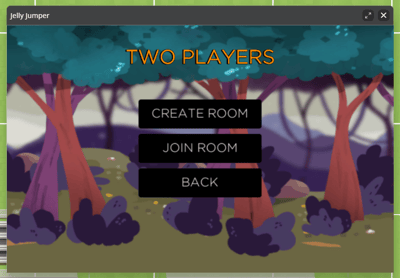
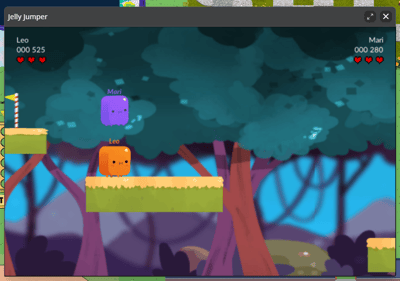
- The game will start once two players have joined. Use your spacebar to jump across gaps and avoid obstacles! When both players lives are gone, the game ends.
Jelly Jumper Game Controls
- Click the game area or press the spacebar to make the jelly jump upward.
- Hold click or hold spacebar to jump longer.
- Double click or double press the spacebar to jump twice.
Tips for Playing Jelly Jumper
- Use small, controlled clicks or spacebar taps instead of button mashing.
- Aim for the area between obstacles.
-
Try to keep a steady rhythm as speed increases.
Jelly Jumper for Admins
Editors, Designers, Managers, or world Owners can add the Jelly Jumper app to their world.
To Add Jelly Jumper:
- Click Builder Mode
 in the left sidebar or press B on your keyboard to enter Builder Mode.
 - Click Scenes
 in the left sidebar.
 - Search for 'Jelly Jumper App' in the
 Filter Results search bar.
 - Hover over the thumbnail image and click Drop Scene
 .
.
- Click an area in the world to drop the Jelly Jumper app in that location.