
| This article explains what Virtual Pet is, how to add it to your SchoolSpace world, and how students and teachers interact with the app. |
Keep reading to learn about:
 Adding Virtual Pet App to a World
What is Virtual Pet?
Virtual Pet is a SchoolSpace app where players adopt and care for a virtual pet, watching it grow and thrive. As player care for their pet, their pet levels up and players can unlock new colors and a custom pet emote!
 |
Playing Virtual Pet
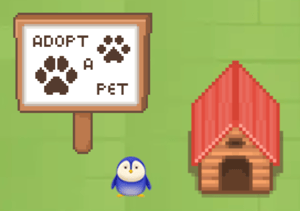
Everyone can have a Virtual Pet! Click any pet in the world to see who it belongs to. Click the 'Adopt a Pet' sign to open Virtual Pet instructions in the world or follow the steps below to adopt and care for your pet.
To Adopt a Pet:
- Click the pet house. The Virtual Pet app will open on the left side of your screen.
- Click the 'Adopt a New Pet' button at the bottom.
- Choose a name from the dropdown and a pet type.
- Click the button at the bottom to choose your pet!
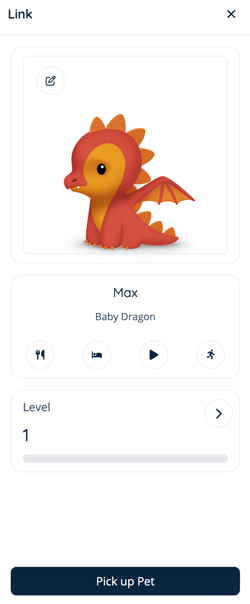
- Click the Call Pet button to make your pet appear in the world. Your pet will follow you as you explore the world!

- Your pet starts as a baby at Level 1. You help it grow by caring for it. Click the Arrow
 icon next to your pet's level to see all levels and growth stages.
To Care for your Pet:
- Click the pet house. The Virtual Pet app will open on the left side of your screen.
- Click the Call Pet button to make your pet appear in the world. Your pet will follow you as you explore the world!
- Click an option to Feed
 , Sleep
  , Play
  , or Train
  .
. - Your pet's level will increase! As your pet levels up, you will:
- Unlock new colors for your pet.
- Watch your pet grow from a baby, to a teen, to an adult.
- Unlock a custom pet emote.
- Click the Arrow icon next to your pet's level to see all levels and growth stages.
- Your pet will need a break before eating, sleeping, playing, or training again. Check back later if the option is greyed out!
To make your pet follow you, click the pet house and use the 'Call Pet' button. Your pet must be with you in order to take care of it! You can call one pet at a time. To make your pet stop following you, click the pet house and use the 'Pick Up Pet' button.
To Change your Pet's Name or Color:
- Click the pet house. The Virtual Pet app will open on the left side of your screen.
- Click the Edit
 icon next to your pet's image.
 - From here you can:
- Change your pet's name by clicking the Name dropdown and choosing a new option.
- Choose a new color. Don't have any new colors available? Keep caring for your pet to unlock color choices!
- Click the Save Changes button.
To Choose a Different Pet Type:
- Click the pet house. The Virtual Pet app will open on the left side of your screen.
- Click the Edit icon next to your pet's image.
- Click the red 'Put Up for Adoption' button, then click:
- Yes if you want a new pet type. You will lose access to your previous pet and your new pet will restart at Level 1.
- No to cancel and keep your current pet.
- If you've put your pet up for adoption, follow the instructions for adopting a pet to get a new one!
Virtual Pet Badges
Earn badges and show off your Virtual Pet skills! Learn how to add badges to your profile or check your badge progress.
| Badge | Description |
 |
Consistent Care Care for your pet for 7 days in a row. |
 |
Loyal Friend Same pet active for 30 days. |
 |
Well Rested Sleep your pet 15 times. |
 |
Veteran Caretaker Level up your pet to level 15. |
 |
Baby Steps Adopt a pet for the first time. |
 |
Trainer in the Making Train your pet 15 times. |
 |
Growing Up Fast Level up your pet from Baby > Teen. |
 |
All Grown Up Reach Adult stage with any pet. |
 |
Well Fed Feed your pet 15 times. |
 |
Dreamkeeper Adopt a Unicorn. |
 |
Icebreaker Adopt a Penguin. |
 |
Fresh Look Change the color of your pet. |
 |
Pet Party Adopt 3 pets. |
 |
Flamekeeper Adopt a Dragon. |
 |
Let's Play Play with your pet 15 times. |
Virtual Pet for Admins
Editors, Designers, Managers, or world Owners can add the Virtual Pet app. These admin roles can also "Pick Up All Pets" to make all pets hidden. Players can continue to call their pet and make it reappear in the world.
To Add the Virtual Pet app:
- Click Scenes
 in the left sidebar.
 - Search for 'Virtual Pet' in the
 Filter Results search bar.
 - Hover over the thumbnail image and click Drop Scene
 .
.
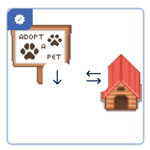
- Click an area in the world to drop the Virtual Pet app in that location.
- Click the Adopt a Pet sign to open instructions for students and admins.
Place the Virtual Pet app somewhere easy to find, like near a welcome area or common hang out spot.
To Pick Up All Pets:
- Click the pet house. Virtual Pet will open on the right side of your screen.
- Click Settings
 in the upper right of the Virtual Pet page.
 - Click the red Pick Up All Pets button, then click Yes to hide all pets from the world.
Picking up pets removes them temporarily from the world. Pet owners can click the pet house and use 'Call Pet' to make their pet reappear in the world. Their pet will follow them as they explore the world.