
| This article explains what the Multiplayer Soccer app is, how to play, and how admins add Multiplayer Soccer to a world. For a soccer game that can be played solo, check out HotShot. |
Keep reading to learn about:
 Adding Multiplayer Soccer to a World
What is Multiplayer Soccer?
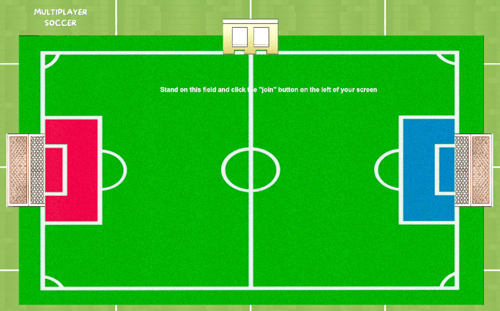
Multiplayer Soccer is a virtual soccer game where teams compete to score the most goals. Players are automatically assigned a team and use their avatars to "kick" the ball into the other team's goal. When the clock runs out, the team with the most goals wins!
 |
Playing Multiplayer Soccer
Everyone can play Multiplayer Soccer! This game is best played with friends! Up to 10 people can play at the same time.
If you don't have enough players, try sending a message in the 'Everyone in World' chat channel and invite people to join your game.
To Play Multiplayer Soccer:
-
Move your avatar into the Multiplayer Soccer game area and click the 'Join' button on the left side of your screen. The first player to click 'Join' is the host.

-
Optional: Hover over the Games
 icon on the left side of your screen to open the menu. Toggle on Focus to keep your screen centered on Multiplayer Soccer. Click Pin
  to keep the menu open.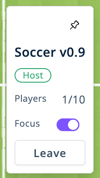
-
After you click 'Join,' a countdown will begin. When the countdown ends:
-
Everyone is automatically assigned a team and their avatar color changes (red or blue).
-
Players are teleported to their team's side of the field and the game begins!
-
-
To score a goal: Move your avatar toward the soccer ball. Touch the soccer ball with your avatar to kick it. Kick the ball into the other team's goal to score!
-
This game ends when the clock runs out. The team with the most points wins!
Multiplayer Soccer for Admins
Editors, Designers, Managers, or world Owners can add the Multiplayer Soccer app to a world.
To Add Multiplayer Soccer:
- Click Builder Mode
 in the left sidebar or press B on your keyboard to enter Builder Mode.
 -
Click Scenes
 in the left sidebar.
 -
Search for 'Multiplayer Soccer App' in the
 Filter Results search bar.
 -
Hover over the thumbnail image click Drop Scene
 .
.
-
Click an area in the world to drop Multiplayer Soccer in that location.
Note: Multiplayer Soccer takes up a large area. Make sure there's enough room before you click to drop!