
| This article explains how Moderators, Managers, or world Owners can enable or disable access to Chat Channels and Direct Messaging for all users in a SchoolSpace world. |
Keep reading to learn about:

Managing Types of Chat Available in a World
What are Chat Channels?
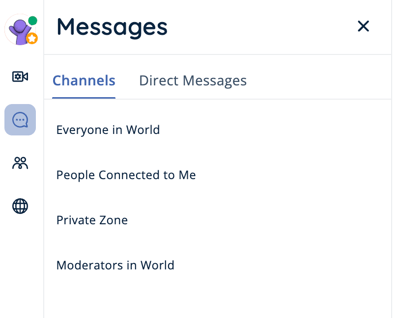
Chat Channels are session-based group messaging tools in SchoolSpace that help students, teachers, and staff communicate. You will only see messages that have been sent in these channels while you have been in the world, so if you leave the world you will not see past messages when you rejoin. Administrators can access and download chat history from chat channels within the Message History section of Dashboard.
 |
Learn more about the types of Chat Channels, how they work, and how to send messages in a channel.
What is Direct Messaging?
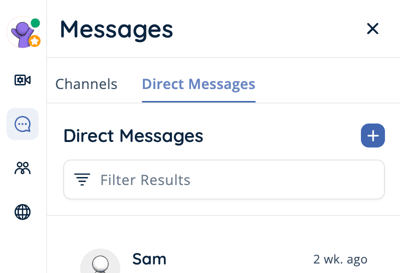
Direct messages allow you to send a message to one or more people. These messages are persistent, so if you leave the world or move to a different world you can keep the conversation going the next time you log in. Messages sent as one on one or group direct messages are not visible in the Chat Channels. Administrators can access and download chat history from direct messages in Dashboard.
 |
Learn more about how Direct Messaging works and how to send one-on-one or group messages.
Managing Chat Availability
As a Moderator, Manager, or Owner in a world, you can update the availability of Chat Channels or Direct Messaging in your SchoolSpace world. These settings give educators and tech leaders flexibility to support school culture, classroom norms, and digital safety practices.
To Enable or Disable Chat Channels or Direct Messaging for All Users in a World:
- In the left sidebar, click World Settings
 → Messaging.
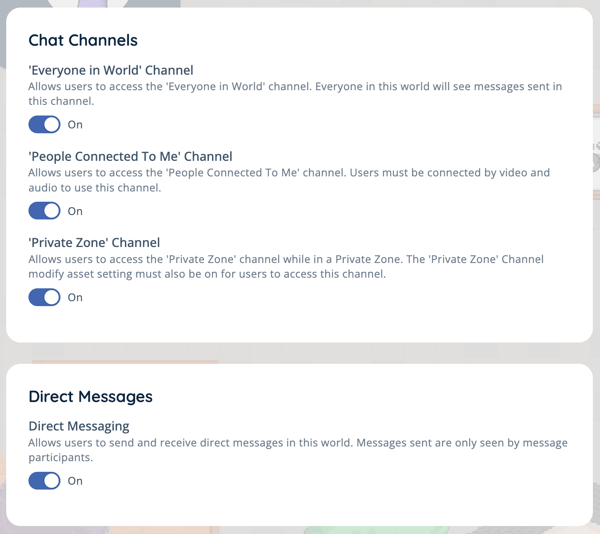
 - Under Direct Messaging or the chat channel (e.g. 'Everyone in World' Channel):
- Toggle on to make available.
- Toggle off to prevent access.
If you want to prevent an individual student from accessing Chat Channels or Direct Messaging, you can ban them from Chat Channels in a world or ban them from Direct Messaging in all your worlds.